help


FREE Digital Signage for everyone

Login to the Web Studio
Get Started, it's FREE


Remove Windows Security Alert Popups (XP)

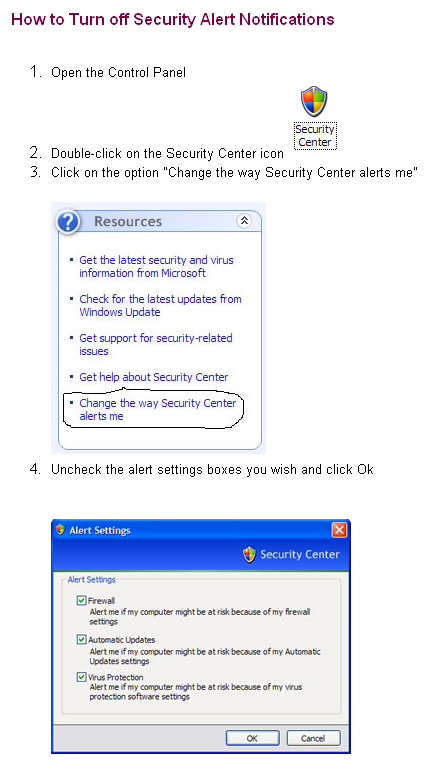
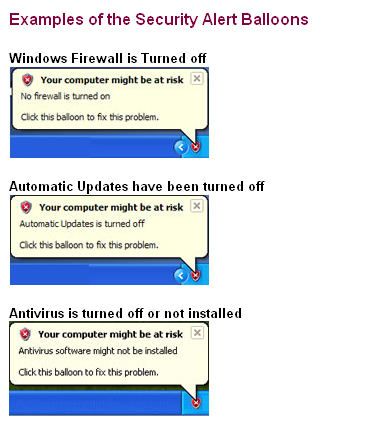
Windows XP SP2 added the security center to monitor firewall, automatic updates, and antivirus settings and to warn users when there is a problem. This is a good idea for the most part, since it gives a visual warning to the user when their antivirus or firewall have been disabled or changed.

However, what if your computer doesnt connect to the internet often enough to update your antivirus, or if you have purposely turned off the Automatic Updates feature. Maybe you dont want Windows to warn you each time you restart your computer or modify something.

I have had several instances where the Windows XP SP2 Security Alert balloons were more of a nuisance than anything else.

ballonMsg2

< Back


ballonMsg


Follow on Twitter


Product

Community

Support

Technology

About

Digital Signage examples

Forum

Video tutorials

Signage Everywhere

Site Map

Sign-up! It’s all FREE

Follow us

Webinar

Signage on Ubuntu

Who are we

Customers

Blog

Live Chat

Signage on Mac OS X

Jobs

Benefits

Content

Email

Signage on mobile

Privacy Policy

Starting out

Resellers

FAQs

Cloud vs Server

Reseller agreement

Players

Our philosophy

Phone

End user License

Summary

RMA

Return / Replacement Policy

 
 © 2006-2012, MediaSignage Inc.